
Backup vs. Disaster Recovery: What Small Businesses Need to Know
Published: July 28 , 2026
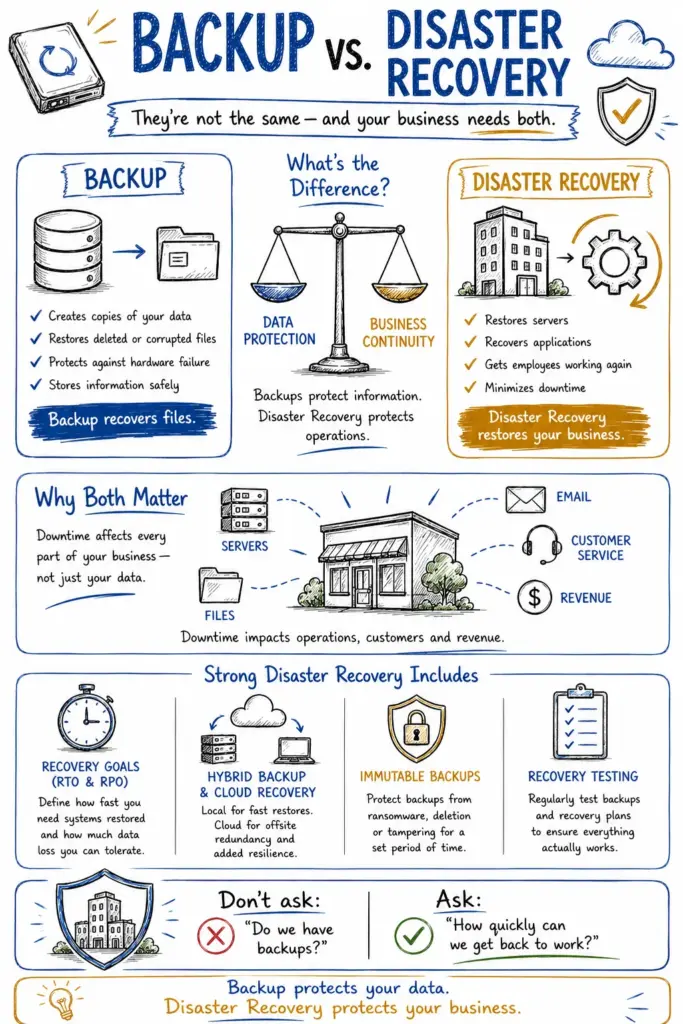
When businesses talk about protecting data, the terms backup and disaster recovery are often used interchangeably. They are closely connected, but they solve different problems. Backup protects your data. Disaster recovery protects your ability to keep working when something goes wrong.
At Accent Consulting, we often speak with small and medium-sized businesses that believe having backups means they are fully protected. Backups are essential, but they are only one piece of a resilient IT strategy. If a server fails, ransomware spreads or a critical system becomes unavailable, the key question is not just whether your data exists somewhere else. It is how quickly your business recovers and returns to normal operations.
That is the difference between backup and disaster recovery.
What Is the Difference Between Backup and Disaster Recovery?
The simplest explanation is this:
- Backup is the process of creating copies of your data
- Disaster recovery is the process of restoring systems, access and operations after a disruption
A backup helps you recover files. Disaster recovery helps you recover the business.
This distinction matters because a copy of your data does not automatically mean you can resume operations quickly. Many businesses have backups in place, but when something goes wrong, they discover that restoring data takes much longer than expected or that important systems were never included in the recovery plan at all.
What Backup Covers
A backup solution protects data by copying it to another location, such as a local device, a cloud repository or both. Backups are essential for recovering from deleted files, corrupted data, hardware failures and cyberattacks.
Backup alone does not cover the full recovery process. It may not tell you how long restoration will take, whether critical servers can fail over quickly or how employees will keep working during an outage.
What Disaster Recovery Covers
Disaster recovery is broader. It focuses on restoring the technology and business functions that keep your company operating. A disaster recovery strategy may include:
- Server and virtual machine recovery
- Cloud failover
- Network restoration
- Backup verification
- Recovery testing
- Documented response procedures
- Business continuity planning
In other words, backup is about data protection. Disaster recovery is about operational recovery.
Why Small Businesses Need Both
For small businesses, downtime is rarely a minor inconvenience. It can stop operations, delay customer service, interrupt billing, prevent access to files and create immediate financial consequences. Unlike larger enterprises, smaller organizations often have fewer spare resources and less tolerance for prolonged disruption.
That is why the conversation should not stop at, “Do we have backups?” The better question is, “If something serious happens, how fast can we get back to work?”
At Accent Consulting, we help businesses think beyond data storage and focus on business continuity. A backup that technically works but takes two days to restore may not be enough if your business depends on constant access to email, accounting systems, file shares or line-of-business applications.
Key Features of a Strong Disaster Recovery Strategy
Not every business needs the same recovery setup, but there are several core features every small business should evaluate when choosing a solution.
Recovery Time Objective and Recovery Point Objective
Two of the most important recovery metrics are:
- Recovery Time Objective (RTO): How quickly your business needs systems restored
- Recovery Point Objective (RPO): How much data loss your business can tolerate
If your team cannot operate without access to a critical application for more than an hour, your recovery solution should be designed around that expectation. If losing several hours of data would create serious operational or financial problems, then your backup frequency needs to be aligned with that risk.
These metrics help businesses choose solutions based on business impact instead of guesswork.
Hybrid Backup and Cloud Recovery
Many of the best disaster recovery solutions for small businesses use a hybrid approach. This means backups are stored locally for fast restores and replicated offsite or to the cloud for added resilience.
This combination provides speed and redundancy. If a file is deleted, a local restore may solve the issue quickly. If a fire, flood or ransomware event affects the office, offsite recovery can become the lifeline that gets the business back online.
Immutable Backup Protection
Not every employee needs access to every file, system or administrative function. The principle of least privilege means users should only have access to the systems and data they need to perform their jobs.
This reduces the impact of compromised accounts, supports better internal control and lowers the chance of accidental exposure. Access permissions should also be reviewed regularly, especially when employees change roles or leave the company.
Smaller access footprints create smaller risks.
Backup Testing and Recovery Verification
A backup strategy is only as good as its ability to recover successfully. That is why regular testing matters. Businesses should not assume backups are working simply because a system says a job completed.
Strong disaster recovery solutions include automated verification; test restores and documented recovery procedures. These measures reduce surprises during an actual emergency.
Before comparing specific tools, it helps to define what a disaster recovery solution should deliver. For most small businesses, the best option is not simply the product with the longest feature list. It is the solution that matches the company’s recovery goals, protects against realistic risks and can be managed consistently over time.
What Are the Best Disaster Recovery Solutions for Small Businesses?
There is no single best disaster recovery solution for every business. The right fit depends on your infrastructure, budget, recovery goals and internal IT capabilities. Still, several platforms consistently stand out for small and growing businesses.
Datto BCDR
Datto is widely recognized for its business continuity and disaster recovery capabilities. It combines local backup, cloud replication and rapid virtualization, allowing businesses to restore systems quickly or run workloads from a backup environment if needed.
For businesses with low downtime tolerance, Datto is often a strong fit because it prioritizes continuity and speed of recovery.
Acronis Cyber Protect
Acronis offers an integrated platform that combines backup, cybersecurity and disaster recovery. This all-in-one model can appeal to small businesses that want fewer tools to manage and a more unified approach to data protection.
It is especially useful for organizations looking to combine ransomware defense, endpoint protection and backup under one platform.
Veeam Data Platform
Veeam is a well-established name in backup and recovery and is known for strong support across virtual environments, servers and cloud workloads. It offers flexibility and visibility, which makes it a good option for businesses with more complex needs or internal IT oversight.
For businesses that want robust customization and detailed backup monitoring, Veeam is often a top contender.
Druva
Druva is a cloud-native solution that can be especially attractive to cloud-first businesses or organizations with distributed teams. Because it reduces the need for local hardware, it can simplify data protection for businesses that want a more modern, scalable recovery model.
It is often a strong choice for businesses protecting SaaS platforms, endpoints and remote users.
Managed Disaster Recovery Services
That is why many organizations benefit from working with a provider like Accent Consulting. We help businesses define their recovery requirements, choose the right solution for their environment, protect both local and cloud data and validate that recovery will work when it matters most.
For many small businesses, the best solution is not just a software platform. It is a fully managed service. Technology alone does not guarantee recoverability. Solutions still need to be configured properly, monitored consistently and tested regularly.
How to Choose the Right Disaster Recovery Solution
Choosing the right disaster recovery solution starts with understanding your business, not just comparing vendors. Key questions include:
- How much downtime can we realistically afford?
- Which systems are mission-critical?
- Do we need local recovery, cloud recovery or both?
- Are our backups protected from ransomware?
- How often are backups tested?
- Who is responsible for managing recovery during an incident?
When businesses ask these questions early, they are much more likely to build a disaster recovery strategy that supports real operations instead of checking a box.
Final Thoughts
Backup and disaster recovery are both essential, but they are not interchangeable. Backup gives you protected copies of data. Disaster recovery gives you the ability to restore systems, minimize downtime and continue operating after a disruption.
For small businesses, that difference matters. A business may have backups and still be unprepared if recovery is too slow, too limited or never tested.
At Accent Consulting, we believe that backup and disaster recovery should be practical, strategic and aligned with business risk. The best disaster recovery solutions for small businesses are the ones that match recovery expectations, protect against modern threats and are actively managed over time.
If your business is not sure whether its current backup strategy is enough, now is the time to review it — before an outage turns uncertainty into lost time, lost revenue and unnecessary risk.
Reach Out To Us
Recent Posts
-
Recognized Among America’s Most Reliable Companies – 2026March 11, 2026/0 Comments -

-
-
-
Why Software Updates Matter More Than You ThinkJuly 17, 2026/ -
-
How to Respond to a Cybersecurity Incident at WorkJuly 16, 2026/ -
What Should You Look for in an MSP?July 2, 2026/